Slack, Salesforce’s workplace messaging service, made Frontline generally available on October 19, 2026, for employees working away from desks. Each account gets one workspace, a company’s Slack environment, and up to 10 administrator-assigned group conversations called channels. The move takes Slack beyond office staff and into territory Microsoft already serves with Teams and its Shifts scheduling tool.
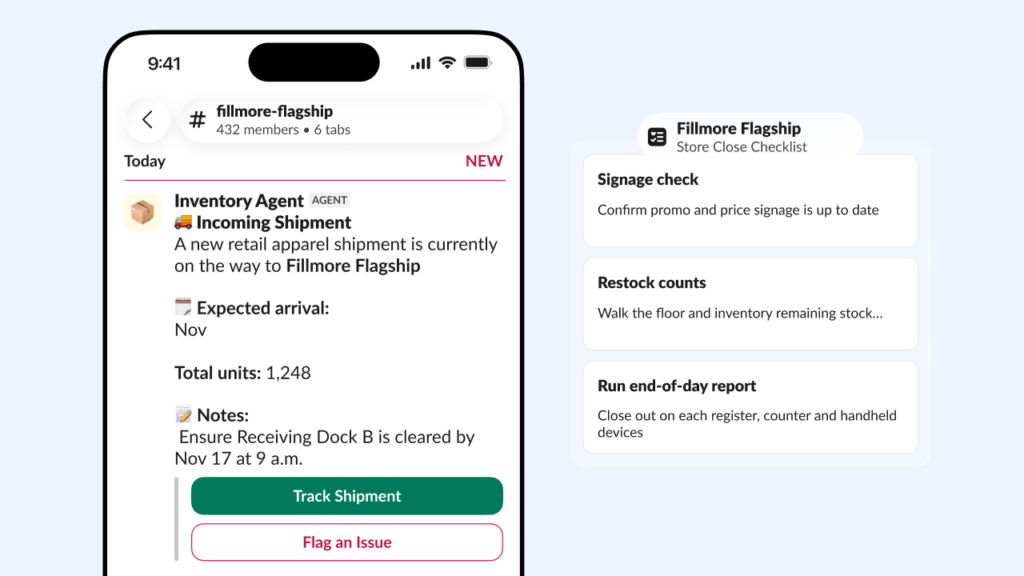
For example, a worker could read a shift update, post a fault photo, and complete a shared checklist. Frontline appeared as a preview in September, and Salesforce now lists it as a generally available add-on.
The accounts come with firm limits. Every assigned seat is billed whether or not it is used, and the AI agents and scheduling links Salesforce advertises are still marked as coming soon.
What Slack Frontline is and what workers can do
Channels, which are group conversations, and direct messages (DMs), which are private chats with one person or a small group, form the core of Slack. Frontline Members are a separate, more limited type of account inside a company’s existing Slack. Each worker sees only what an administrator assigns, which keeps the app to a short list of conversations.
Workers can use the Slack mobile app on iOS and Android, the desktop app or a web browser. A workflow is an automated sequence of steps. Frontline Members can run workflows shared in their channels, but cannot create them.
This table shows what Slack’s Frontline account permissions page says these accounts can and cannot do.
| Action | Frontline Member |
|---|---|
| Send direct messages | Only to people who share one of their channels |
| Use workflows | Can run shared workflows, cannot create them |
| Create channels | No |
| Install or authorize apps | No |
| Use apps that require a separate sign-in | No |
| AI summaries of conversations, threads and files | Help pages differ |
| AI-powered Slackbot | No |
| AI to generate workflows or huddle notes | No |
| Upload files | Up to 1 GB a month |
In a Slack testimonial, Village Hotels chief technology officer Jon Davis says the company is cutting issue resolution from 48 hours to under 20 minutes. A testimonial reports one customer’s experience, not a measured result that other employers should expect.
How workers get access without a work email
Frontline workers do not need a company email address, but they do need an email address of some kind. Slack’s setup guide sets out a fallback email requirement administrators must add a backup address for each Frontline Member, and a personal address is allowed. Employers whose staff have never had any email on file will need to collect addresses before rollout.
Sign-in is less settled. Salesforce’s Frontline page advertises signing in with an employee ID or a QR code, plus multi-factor authentication (MFA), which adds a second check after the first login step. Slack’s help pages instead describe a username, password and verification email. Some companies can also use single sign-on (SSO), which lets one company login open several apps. Slack’s help guides do not explain how the employee ID or QR sign-in is set up.
Rollout involves more than IT. Employers should assign owners for onboarding, task setup and access management.
Before committing, IT teams can test with a real Frontline account rather than an administrator’s, because an administrator’s account has permissions a worker’s lacks. Administrators should also review the Frontline settings in Slack’s organization settings, such as which workspaces Frontline Members can join and when their access expires. A useful trial ends with a new worker onboarded and a shared workflow completed from start to finish.
How much Slack Frontline costs and how billing works
Slack publishes no Frontline rate, so buyers need a sales quote. It says these accounts cost less per person than Full Members, its standard accounts. Salesforce lists the add-on for customers on Slack’s Enterprise+ plan or Salesforce Max (A1E), though Slack’s own blog and help pages describe Enterprise+ only. Salesforce also says availability can vary by region and depends on each customer’s agreement.
Eligibility has its own limits. Slack’s billing page says an organization’s size and its number of Full Members may affect whether it qualifies, or how many Frontline seats it can buy. Slack hasn’t said where those thresholds sit.
Seat counting is the bigger issue. Slack bills assigned Frontline accounts even when unused. Accounts must be deactivated to stop counting, and billed seat counts change on the contract’s adjustment schedule. Full Members work differently, with billing calculated from activity over the previous 28 days. An employer used to that model could easily underestimate its Frontline bill.
Consider a retailer that assigns 100 Frontline accounts while 80 workers actually use them. If P is the quoted price per account for each billing period, the bill is based on 100P, not 80P. That is 20P extra, or 25% more than an active-users-only budget would predict. The example leaves out the cost of the base Slack plan, and the contract decides how often seat counts can be adjusted.
Where staff turnover is high, deactivating accounts for people who leave becomes part of controlling cost.
How Slack Frontline compares with Microsoft Teams Shifts
Microsoft already offers scheduling for frontline staff inside Teams. Its Microsoft Teams Shifts documentation covers schedules, time-off requests, shift swaps, and clocking in and out. Shifts can run on its own or connect to a workforce management system, the software companies use to plan schedules and track hours. Microsoft notes that integration options vary.
Teams Shifts documents these scheduling functions today, Salesforce marks its Frontline Workforce Management integration as coming soon.
Both companies sell cut-down accounts for these workers. Microsoft’s frontline plans with Teams include collaboration tools, while its F1 and F3 plans leave out the desktop Office apps. For an employer already on Slack, the real question is whether channels and shared workflows cover the shift, or whether scheduling must stay in another system for now.
What Frontline workers cannot do and what is still coming
Huddles, Slack’s quick live calls, are one open point. Slack’s permissions table says Frontline Members can join a huddle in a channel but cannot start one, yet the launch post shows workers starting them. Employers who want staff to call a manager from the shop floor should get Slack’s answer in writing before buying.
Administrator controls get a longer list in Slack’s launch post MFA, management of apps and agents, and compliance settings for Enterprise+ customers. The settings are intended to support HIPAA healthcare privacy requirements and FINRA rules for securities firms. Compliance settings help, but they do not make a deployment compliant automatically.
The larger gap is the AI behind much of the launch pitch. Salesforce’s page marks two parts as coming soon: access to agents, including Agentforce and third-party agents, and the workforce management integration. The page gives no delivery date for either. Buyers weighing Slack’s agents against other workplace AI agents, such as Google’s Gemini Work Agent, should treat Slack’s as a roadmap item rather than something they can deploy now.
That leaves one milestone to look for: either feature moving from coming soon to available. Until it does, Frontline is a messaging and checklist tool, not the agent-assisted shift system its marketing shows.
Sufyan’s view: Slack Frontline suits employers whose staff mainly need assigned channels and shared checklists. The bigger risk is the bill. Every assigned seat is charged whether or not it is used, so set an expiry for temporary or seasonal accounts before rollout and confirm with Slack when deactivation lowers the bill under your contract.
