
Google says schools are in control of which of its AI services students can use. Gemini is Google’s AI assistant, and Classroom is its platform for school assignments. Under plans announced on 3 November, Gemini, Gemini Notebook, Gemini in Classroom, and Google Search will be off for school-managed K-12 student accounts until an administrator turns them on. One option is missing from the plan Google has described: Google Search for students without its AI features. Chris Phillips, Google’s vice president and general manager of education, put it plainly in an interview with Chalkbeat: “If a school is not comfortable with that and simply wants AI off, then they have the choice to not have search on at all.”
In its November report on AI in education, Google lists “academic integrity, cognitive offloading, and training and policy gaps” as concerns, and its post on X says schools “have told us they want control.” Alongside the stricter defaults, Google is expanding Guided Learning, a Gemini mode that walks students through problems with questions and hints.
None of the new defaults has taken effect yet, and they are separate from the Guided Learning rollout that began on 3 November. Today, Gemini in Classroom is on by default for users of all ages, a setting Google switched on in August.
Which student accounts change, and when
The planned defaults cover school-managed K-12 student accounts, but Google’s announcement gives no rollout date, only that it will “share more specifics with schools in the coming months.” K-12 means kindergarten through secondary school. Google education chief Chris Phillips wrote in the announcement: “Access to these products will be entirely off for K-12 student accounts until school administrators explicitly turn them on.” The announcement does not extend that promise to teacher, university, or personal accounts.
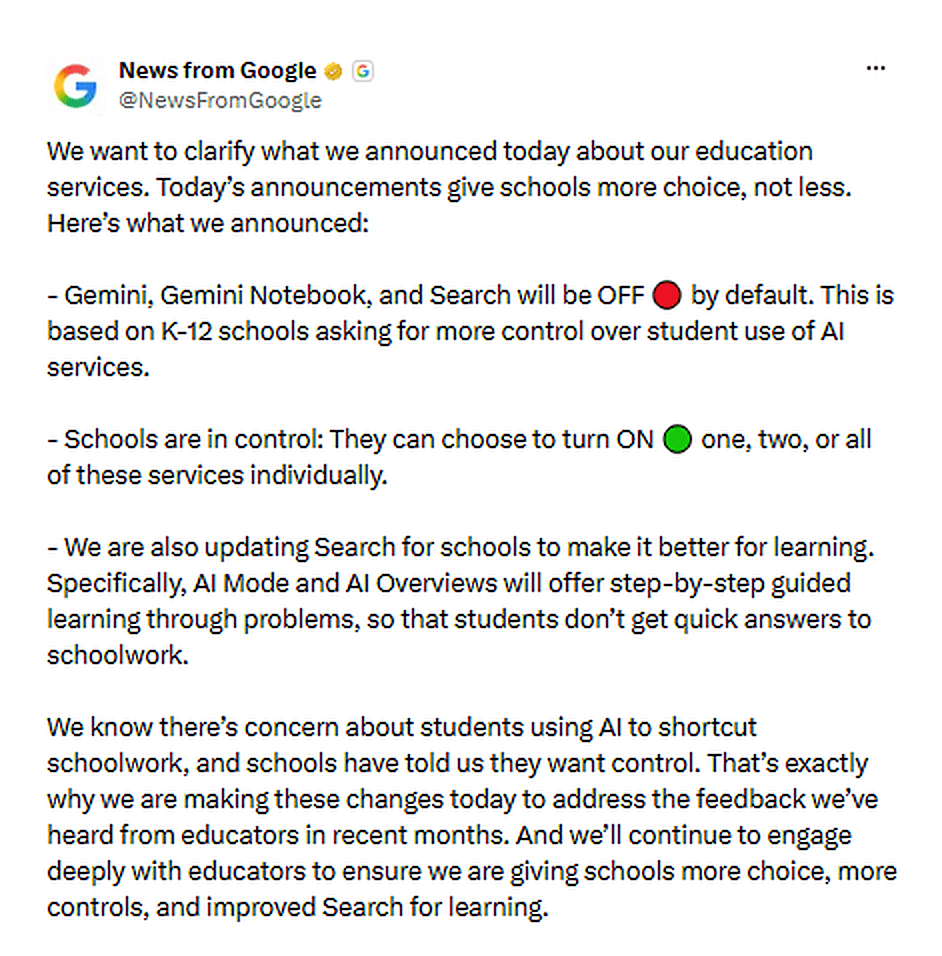
Some early reports said schools could not pick services one by one. Google then posted a clarification on X saying Gemini, Gemini Notebook and Search will be off by default. It added that schools “can choose to turn ON one, two, or all of these services individually.”
Why turning off AI also turns off Search
Separate switches do not split Search from the AI inside it. Phillips explained why in The New York Times report: “Search and AI are deeply integrated.” If a school has banned AI, he said, students “will not have access to search, and they’ll see a message from their school that indicates it’s not available.” For a school that wants no AI at all, the choice is Google Search with its AI features or no Google Search for students. Google’s blog post does not spell that out.
AI is part of Google’s own plan for school Search. Its X post says AI Mode and AI Overviews “will offer step-by-step guided learning through problems, so that students don’t get quick answers to schoolwork.” AI Overviews are the AI-written summaries shown above search results, and AI Mode is Google’s chat-style way of searching. So the Search a school turns on would include these tutoring features.
In the same report, Google executives said that, for districts that allow AI, school accounts will get two Search options beginning in early 2027. One has AI Overviews and AI chats on, similar to the consumer version. The other uses Guided Learning. Both include AI. Google’s own blog post and X post give no date.
Common Sense Media wants a different option. Eisha Buch, its head of teaching and learning, calls Google’s offer “a choice that isn’t really a choice.” In Chalkbeat’s report, she added: “Google could be putting its efforts into letting schools turn off AI Overviews and keep search.”
What schools can check in Classroom today
Current settings run opposite to the plan. Google’s current Classroom access settings page states that “Gemini in Classroom is ON by default for users of all ages.” If a school previously turned it off for students under 18, it stays off until an administrator changes it. Google last updated the page on 26 October.
Gemini in Classroom is supported in Education Fundamentals, Standard and Plus, in Classroom-supported languages where Gemini is available. Google says Education Fundamentals is available without cost for qualified educational institutions and includes access to Gemini in Classroom, while advanced capabilities come with Education Plus and select add-ons.
Administrators find the control at Menu > Generative AI > Gemini for Workspace > Feature access in Classroom. It can apply to all of the school’s managed accounts or to an organizational unit, which is a branch of the school’s account structure, such as one year group. It can also apply to a configuration group, a set of users with its own access rule. Google says “Group settings override organizational units.” That means a student in an enabled group can keep access that their unit has switched off.
Inside Classroom, the Gemini tab has a second condition. It appears only when Gemini in Classroom is on, and the student also has the Gemini app, Gemini Notebook, or both. Gemini Notebook is Google’s tool for studying from a set of sources. If the app and Notebook are both off, the tab is hidden.
What Guided Learning needs, and what teachers see
Guided Learning began rolling out in Classroom globally on 3 November. The feature first arrived in the Gemini app in August 2025. In Classroom, it works “like a 1-1 study tool” for activities a teacher assigns. Teachers build those activities on a computer from sources such as Docs, Slides, or PDFs. Google recommends one source and allows up to five. Company officials have also said, in Chalkbeat’s coverage, that students will not be able to switch back into regular Gemini within Google Classroom.
Access depends on one specific service. According to Google’s Guided Learning requirements, both teacher and student need administrator-enabled Gemini app access. Compare that with the tab rule. If Gemini in Classroom is enabled, a student with Gemini Notebook on and the Gemini app off can see the tab. That student still cannot use Guided Learning, which needs the app. A visible tab shows only that at least one of the two services is on. The surest check is to open an assigned Guided Learning activity from a student test account in the right group.
Teacher oversight has limits too. Teachers see insights and transcripts only for Guided Learning assigned through Classroom. A student’s other Gemini chats stay hidden from them. “Transcripts are only available when Gemini activity is on,” the help page says. If administrators let students delete their chat history, deleted chats also disappear from the teacher’s view. Google adds that the insights “are not intended for assessment or placement” and can make mistakes. The same page says Guided Learning avoids defaulting to direct answers, so its default is to coach students toward the answer.
For evidence, Google points to its learning research. In a randomized trial, more than 300 University of Tokyo students spent half a day on a statistics lesson. Those using Guided Learning in the Gemini app improved by 8.1 percentage points, against 5.3 for those using standard web tools. Google calls that “1.5x higher learning gains.” The arithmetic checks out: 8.1 divided by 5.3 is about 1.53, and the gap is 2.8 percentage points. Because the comparison is between improvements, it does not mean final scores were 53% higher.
These were university students in a single session, using the Gemini app. The trial does not show how school-age students would do, or how the Search version would perform. A separate four-week pilot with Ark across three secondary schools and four subjects collected teacher and student feedback and reported no test scores.
Sufyan’s view: I would check the Classroom setting today, because it is on by default for every age group. A visible Gemini tab does not mean Guided Learning is ready, and teacher monitoring covers only assigned activities. The bigger question is Search. Schools that want students to have Google Search without AI have no such option yet, and Google should say clearly whether it will offer one.
