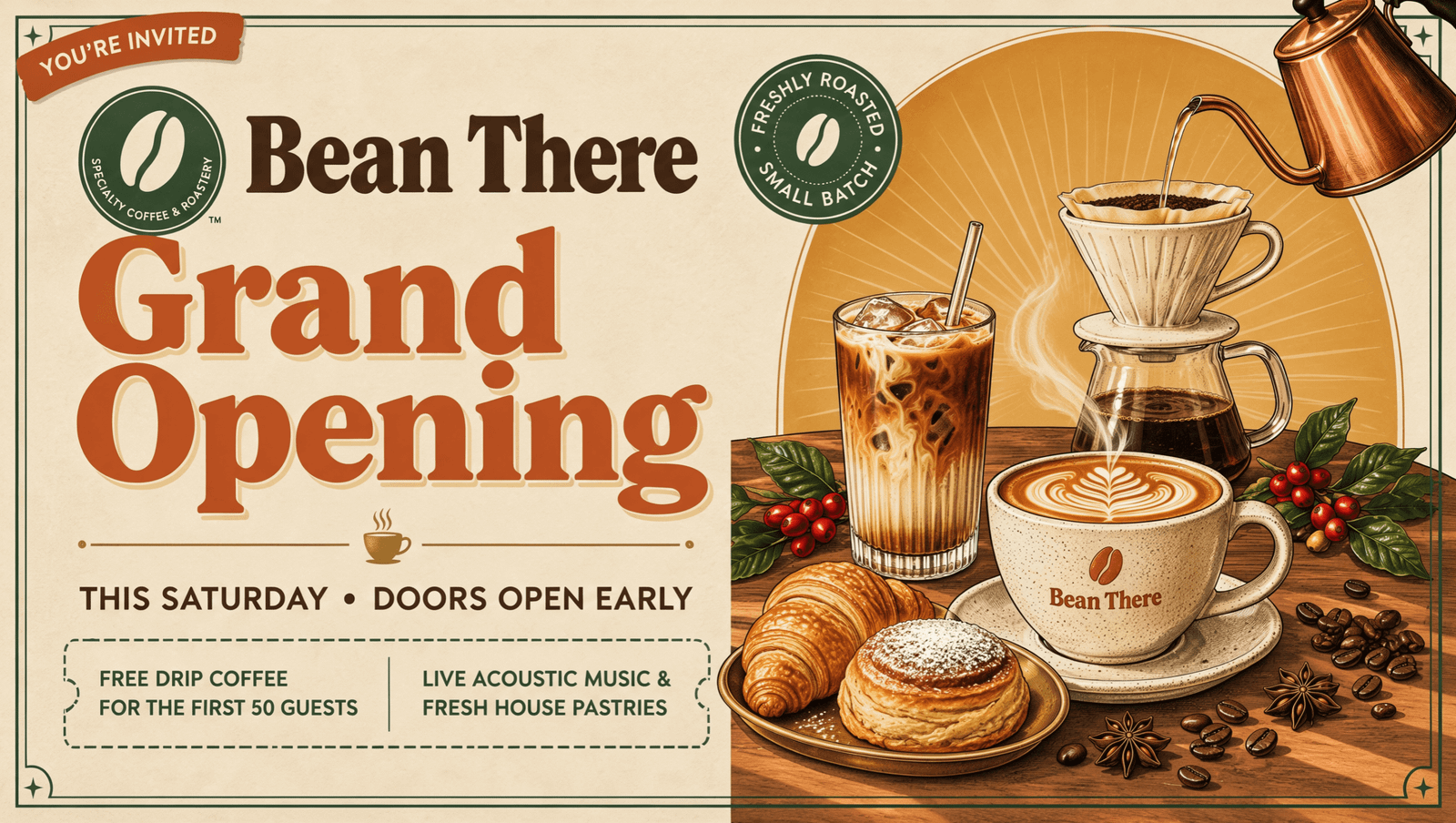
Design platform Canva launched its Craft image model in Dream Lab on 22 October 2026. Every Canva user can try it within a limited AI allowance. Developers can also access it through Canva’s API, which is still in preview.
According to Canva, Craft plans a design before rendering it and can set text in 55 languages. In our test on a Free Canva account, every word we requested was spelled correctly in all four posters. Craft also added free coffee, live music, and an opening time that nobody had asked for.
Behind the launch is a wider shift in AI design. Teams need output they can revise inside the tools they already use, not just a good-looking picture. Craft produces a flat image, and making its text and objects editable takes a second tool, Magic Layers.
What is Canva Craft?
Canva Craft is the company’s image-generation model, and Dream Lab is the workspace where you choose it. Canva suggests uses such as event posters, infographics, and campaign visuals.
According to the Canva Craft announcement, the model plans the layout before it renders the image, and its training data includes millions of designed templates. Output reaches up to 2K resolution in more than 30 aspect ratios, meaning frame shapes such as widescreen 16:9.
On the DesignArena leaderboard, Craft placed fourth overall at launch, and Canva says it compared more than 25,000 pairs of images internally. A single leaderboard position is not a verdict on every kind of design work.
This is not Canva’s first AI model, though. Magic Layers, the tool that turns images into editable designs, runs on a separate Canva Design Model. Dream Lab itself launched in October 2024 using Phoenix technology from Leonardo, which Canva acquired that July.
What happened when we tested Canva Craft
We tested Craft on a Free account on 23 October. Dream Lab listed the model as “Canva Craft-1 2K”, and we chose no style, a 16:9 frame, and the quality option shown as “Premium”. The prompt read: A poster for a coffee shop grand opening this Saturday, with the headline “Grand Opening” and the shop name “Bean There”.
Four posters arrived in about 57 seconds. “Grand Opening”, “Bean There” and “Saturday” were spelled correctly in every one.
Then Craft improvised. Unrequested additions included “Doors open at 7:00 AM” and a free pour-over and pastry for the “First 100 guests”. Other additions included “Free drip coffee for the first 50 guests” and “Live acoustic music”. Each looks like a believable offer. On a real shop’s poster, any one of them becomes a promise the owner never made.
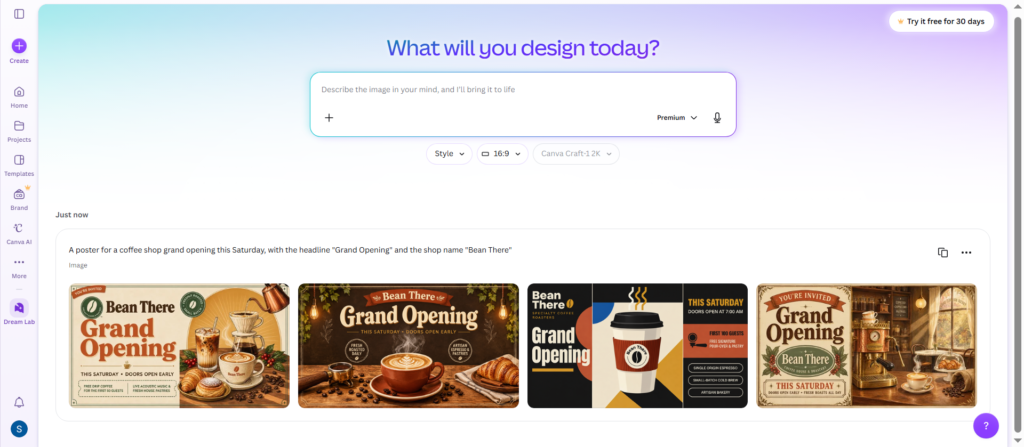
So proofreading becomes a content job, not just a spelling check. This was one test with one prompt, not a benchmark.
Does Canva Craft make editable designs?
Not by itself. A Craft image only gains separate, editable text and objects after Magic Layers rebuilds it as a Canva design. That tool also accepts images from other generators.
Conversion took about five seconds on one of our posters. Changing “THIS SATURDAY” to “THIS SUNDAY” worked and kept the original color. Deleting the “first 50 guests” line left a clean background, and the coffee cup moved as its own object.
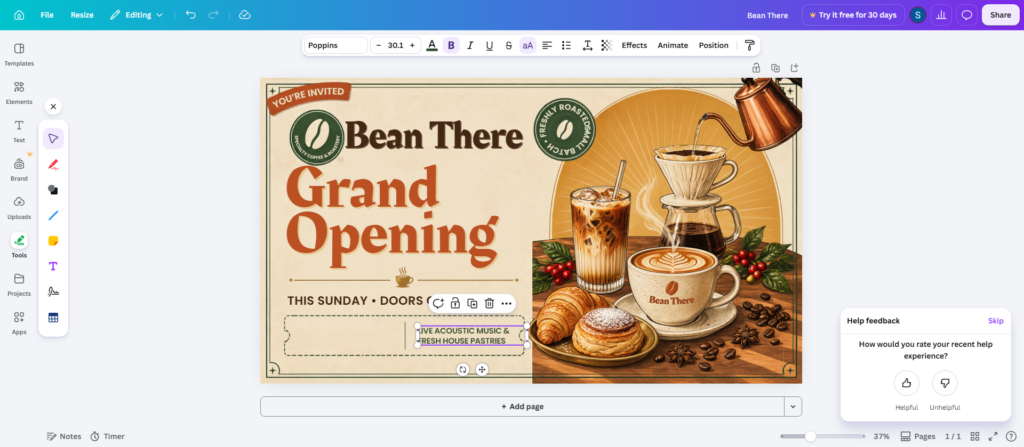
One element broke in the rebuild. A circular badge reading “Freshly roasted” and “Small batch” came back with two words run together as “ROASTEDSMALL”, which would need fixing before use.
Input limits are strict under Canva’s Magic Layers instructions. The tool takes a single-page PNG or JPG, not a PDF or vector file, and the longest edge cannot exceed 5,000 pixels. Canva also warns that photorealistic images may not separate cleanly. Its earlier Magic Layers announcement described a public beta in the US, UK, Canada, and Australia, so EU readers should confirm the tool appears in their account.
Adobe takes a different route. Adobe says its Express AI Assistant creates designs with directly editable text and layers, so no conversion is needed. That beta covers only Free and Individual Premium accounts, excluding Teams, Enterprise, and Education. For a marketing team, the real comparison is how much work a revision takes, not how the first picture looks.
Commercial use is allowed under Canva’s AI product terms, provided it is lawful and at the user’s own risk. Outputs may not be unique, and licensed content inside them keeps its own restrictions.
Is Canva Craft free, and how much AI allowance does it use?
Yes, any Canva user can try Craft within a limited monthly AI allowance shared with Magic Layers. Unlike FLUX 3 Image Klein, which you can download and run on your own computer, Craft runs only inside Canva and draws on your plan’s allowance. A Craft-specific per-image price and standalone API tariff remain unconfirmed.
Each plan’s allowance is estimated in “Premium uses” for simple, low-cost tasks. Prices are in US dollars before tax, billed annually, with local amounts on the Canva plan prices page.
- Free: up to 20 uses a month, at no cost
- Pro: up to 200 uses a month, at US$144 per person a year
- Business: up to 400 uses a month, at US$250 per person a year
Allowances belong to each person, not the team. Canva says they aren’t shared or pooled across a team or organization, so a Business team cannot move a quiet member’s unused allowance to its busiest designer.
Our meter rose from 0% to 20% after one batch of four images, then to 28% after one Magic Layers conversion. These rounded readings describe our session, not fixed per-image charges.
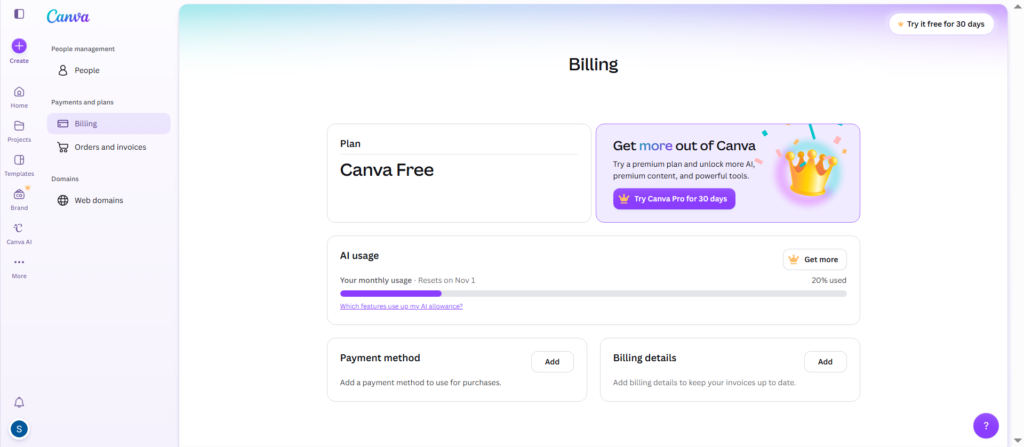
That matches Canva’s pricing page, which marks “Try Magic Layers” as a tool that uses the shared AI allowance.
These allowance estimates do not establish a fixed monthly Craft image quota. Canva says task complexity changes usage, and Free users are paused once their allowance runs out.
Before using Craft for client work, convert a real poster, change its date, move one object, and check the meter. That reveals both rebuild quality and the true cost of a revision on your own plan.
Can you use Canva Craft through the API or ChatGPT?
Developers can call Craft through Canva’s image generation API preview, while Craft support through Canva’s AI assistant connections is coming soon. An API lets one program request work from another, so an app can ask for images without the user opening Canva.
The user must authorize the app, permit it to save assets through asset:write, and have access to image generation. Starting a generation job draws on the user’s AI allowance. Requests fail when that allowance is exhausted.
Preview status carries a hard limit. Canva’s documentation says public apps built on preview APIs will not pass its review and cannot be offered to all Canva users. Builders can experiment now but should not promise customers a public release.
Aspect ratios are narrower in the API. Its reference lists six, Canva’s developer announcement lists three, and neither approaches the more than 30 in Dream Lab.
Editing through the API is a separate job. A developer starts an image to design conversion on an image already uploaded to Canva. Starting conversion uses AI allowance. Checking its progress does not. Placing the flat image in a design avoids conversion credits but leaves its contents unseparated.
Canva already connects to ChatGPT, Gemini, Claude, and Copilot. MCP means Model Context Protocol, which lets AI assistants connect to tools. Canva has announced no dates for Craft MCP support or the planned Craft-fast and Craft-ultrafast models.
Sufyan’s view: Craft spelled every word we asked for, and Magic Layers made the poster editable in seconds. The catch is that Craft added offers we never requested, so have the business approve every date, price, and offer in the final design before it goes public.
